
REALITY-Become an Anime Avatar
REALITY, Inc.Social
3.67.75K Reviews
- Version
- 26.34.0
- Installs
- 10.00M
- Age Rating
- Teen
Screenshots

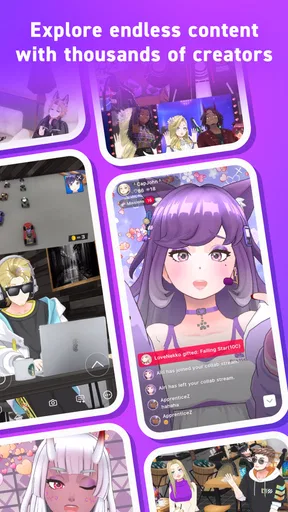
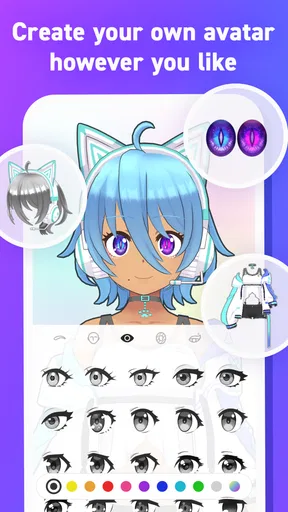
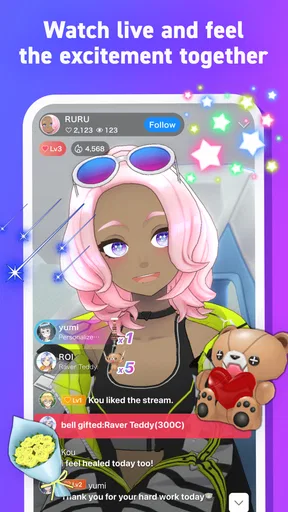
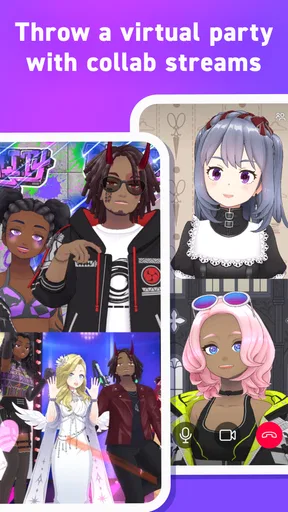
Our Review of REALITY-Become an Anime Avatar
 Analysis by Appyee
I find REALITY-Become an Anime Avatar most appealing when I think of it not simply as an avatar maker, but as a way to bring an anime-style persona into social interactions. It is a free social app from REALITY, Inc., and that combination matters: you can try its central idea without paying upfront, then decide whether its live, community-oriented approach suits you. The app is aimed at teens and older users, so I’d also treat its social side as something to use thoughtfully rather than as a private character-design tool.
What free access does—and doesn’t—tell you
You can install it for free, which makes experimenting with an avatar and seeing whether the community appeals to you a low-commitment start. There are in-app purchases, with individual items priced from $0.29 to $99.99. That broad range is worth noticing before spending: free access is real, but purchases are part of the experience, and the most expensive option is not a sensible default for a new user.
I’d begin by exploring what you can do without buying anything. If you later see an item you genuinely want, pause and check its price and what it adds before confirming. The key question is whether a purchase makes your own experience more enjoyable—not whether you need it to justify trying the app. I wouldn’t budget around a particular item or assume that spending is required to participate.
Where the app’s value comes from
The strongest value here is the connection between character creation and social expression. An avatar can give you a recognizable on-screen identity, and live broadcasting lets that identity take part in interaction rather than remain a still image. If you enjoy anime aesthetics but are hesitant to appear on camera as yourself, that can be a more comfortable way to present yourself while chatting or streaming.
There is also value in having a creative project with a social destination. Instead of making a character, saving it, and moving on, you can use the design as a starting point for meeting people with similar interests. That distinction separates this from a typical avatar editor: the appeal depends not only on the look you create but also on whether you want to share and interact through it.
Try the social loop before investing time or money
My practical advice is to treat the first session as a test, not a makeover marathon. Make a recognizable version of your character, spend a little time seeing how the social side feels, and then return to finer customization if you’re enjoying it. This helps answer a useful question early: do you want a polished avatar for ongoing interaction, or were you mainly curious about making an anime character once?
For a more considered design, choose a few traits that are easy to recognize—such as a particular hairstyle, eye style, or color direction—before adjusting every detail. When you’re making a persona for live use, readability matters more than tiny refinements. A design that feels like you at a glance is often more useful in a social setting than one that took a long time to perfect but is hard to recognize on screen.
Another trade-off is that social participation asks for a different kind of attention than solo creation. You may be happy adjusting expressions and accessories but find that following people, commenting, or broadcasting is not your thing. That doesn’t make the design time wasted, but it does mean the app’s broader value will be lower for you than for someone who likes both creating and sharing.
Getting Started with Reality
First things first, let’s talk about the setup. Downloading REALITY-Become an Anime Avatar is a breeze. Available on both Android and iOS, the app is free and takes up only a modest amount of space on your device, so you don't have to worry about it hogging all your storage.
Once you’ve got it installed, you’ll be greeted by a user-friendly interface that’s as colorful and lively as the anime characters you’re about to create. Setting up your avatar is super intuitive. You start by selecting your base character, and from there, the customization options are seemingly endless. Whether you're going for a cool, edgy look or something more cutesy and kawaii, the app provides ample options to tailor your avatar to your liking.
Customization Galore
Diving deeper into customization, you’re presented with a wide range of hairstyles, eye shapes, and clothing options. The level of detail you can achieve is impressive, and the app even allows you to adjust colors and patterns to give your character a truly unique flair.
But it doesn’t stop there. You can also tweak facial expressions, add accessories, and even incorporate fun backgrounds to set the scene. Whether you want your avatar to be chilling in a cherry blossom garden or posing in a futuristic cityscape, the choice is yours.
Connecting with Friends and Followers
Once your avatar is ready, the real fun begins. REALITY offers a social platform where you can share your creations with friends and fellow anime enthusiasts. The app lets you broadcast live with your avatar, adding a dynamic layer to your interactions. Imagine hosting a live Q&A or streaming a gaming session as your anime persona!
The community aspect of the app is vibrant and engaging. You can follow other users, comment on their avatars, and even collaborate on projects. It’s a fantastic way to connect with people who share your passion for anime and creativity.
A realistic first week
Picture a typical evening: you have a few minutes to spare, so you open the app and adjust your avatar’s look. Later, when you have more time, you browse other creators and decide whether you’d enjoy joining the conversation or broadcasting. That gradual route is more useful than trying to build a perfect persona immediately. It lets you learn what you actually want from the app before you put serious time into details or consider a purchase.
If you mainly want a profile picture, a dedicated avatar maker may be the more efficient choice. Such tools are usually better suited to producing an image for another social network, while this app’s distinctive draw is using an anime persona within its own social environment. Conversely, if your goal is live expression and meeting anime-minded people, a static portrait editor won’t provide the same kind of interaction.
It also differs from ordinary camera-based social apps. Here, the avatar is the visual identity, which may feel freeing if you prefer not to lead with your face. The exchange is that your experience depends more on the character and the app’s social activity. Someone who wants a straightforward feed for real-life photos, or private messaging as the main purpose, may be happier with a conventional social platform.
Small choices that improve the experience
One useful approach is to make your avatar adaptable rather than treating its first version as final. Start with a look that feels comfortable, then refine it after you’ve seen how it reads in social use. A design that looks striking in a customization screen may feel too busy once it becomes your on-screen identity. Checking the overall impression before adding more accessories can save time and keep the character coherent.
It’s also worth deciding what you want to share before you go live. A simple topic—talking about an anime you like, answering a few questions, or streaming a game—gives a broadcast a natural focus. You don’t need to treat every session as a performance. If you’re not ready to broadcast, following creators and commenting can be a lower-pressure way to find out whether the community feels welcoming to you.
Because the app is social and rated Teen, I’d use the same care I would with any online community: avoid sharing personal details you would not want public, and think before responding to strangers or moving conversations elsewhere. The avatar can create distance from your offline identity, but it doesn’t remove the need for sensible boundaries. That is particularly important for younger users and anyone new to live social spaces.
Performance, device fit, and expectations
The current version is 26.9.0, and the minimum operating-system requirement is Android 9. That makes checking your device’s software version a sensible first step if you’re installing on an older phone. The app’s live-avatar concept also asks more of a device and connection than simply viewing a static character, so I’d test a short session before planning a long broadcast, especially if your phone already struggles with demanding apps.
Ratings offer a broad signal, not a guarantee of how you’ll feel about the experience. It has a 3.6 average from around 105,000 ratings, alongside roughly 7,700 written reviews. I read that as a reason to try it with measured expectations: the idea clearly attracts a substantial audience, but the experience is not universally satisfying. Whether it works for you will depend heavily on how much you enjoy the social and live elements, not just the avatar editor.
Performance and User Experience
In terms of performance, the app runs smoothly on most devices. The developers have done a great job ensuring that the animations are fluid and the graphics are sharp. It’s evident that a lot of effort has gone into making the experience as seamless as possible, even when you're streaming or sharing content.
One of the standout features is the app’s ability to track your movements and expressions in real-time. This means your avatar can mimic your gestures and facial expressions, adding a layer of realism to your interactions. It’s quite fascinating to see your anime avatar come to life in such a personalized way!
Who is likely to get the most from it?
I’d recommend giving it a try if you enjoy anime character design and want that character to have a role in social interaction. It is especially suited to people who like the idea of broadcasting as an avatar, gradually shaping an online persona, and finding others with related interests. REALITY, Inc. has built an experience where those activities belong together, rather than treating the character as a one-off export.
I’d be more cautious if you dislike public or semi-public interaction, have no interest in live broadcasting, or only need a single illustration for a profile. The social side is central enough that a person seeking a quiet, offline creative tool may find the rest unnecessary. Likewise, if you prefer traditional video calls where people appear on camera, the avatar-first approach may feel like an extra layer rather than a benefit.
There is no need to spend money just to find out which group you belong to. Since the app is free to start, you can explore its basic appeal first. With more than 10 million installs, it has reached a large audience, but popularity alone cannot tell you whether its particular mix of creativity and social activity matches your habits.
Final Thoughts
All in all, REALITY-Become an Anime Avatar is a delightful app that offers a unique blend of creativity, social interaction, and entertainment. Whether you’re a die-hard anime fan or just someone looking to try something new and fun, this app is definitely worth checking out. It’s a creative escape that allows you to express yourself in the colorful and imaginative world of anime.
So, if you’re ready to dive into this anime adventure, go ahead and download the app. Your anime alter ego awaits!
My buy-or-skip verdict
I’d try it free if I wanted an anime identity that could carry into social activity, and I’d hold off on purchases until I knew I would return to the app. The in-app purchase range runs from $0.29 to $99.99 per item, so the sensible value depends on choosing deliberately rather than treating paid items as an automatic part of getting started. If avatar creation is your only goal, use a dedicated editor instead; if you want a character-led social space and are comfortable with its public-facing side, this is a more distinctive option.
For me, the deciding factor is not how many customization choices I can make but whether I enjoy using the finished avatar with other people. Try a basic design, explore at your own pace, and see whether following, commenting, or going live feels fun rather than obligatory. If it does, the free entry point makes the experiment easy to justify. If it doesn’t, there’s little reason to force the social part or spend money simply because the editor caught your eye.
Verdict
Strengths of REALITY-Become an Anime Avatar
- Wide variety of customization options.
- High-quality graphics and animations.
- User-friendly interface.
- Regular updates with new features.
- Supports social media sharing.
Limitations of REALITY-Become an Anime Avatar
- Occasional lag on older devices.
- Some features require in-app purchases.
- Limited free avatar options.
- Ads can be intrusive at times.
- Requires a stable internet connection.
Similar Picks in This Category
View All
Meta Platforms, Inc.4.6

Instagram4.0

Likee-Live, Chat & Party Games
Likeme Pte. Ltd.4.4

Facebook Lite
Meta Platforms, Inc.4.5

TikTok - Videos, Shop & LIVE
TikTok Pte. Ltd.4.0

Moj: Free Short Drama & Reels
ShareChat4.1
You May Also Like
View All
Frequently Asked Questions
What is REALITY-Become an Anime Avatar?
REALITY-Become an Anime Avatar is a mobile app that allows users to create and customize their own anime-style avatars. With a variety of features, users can live-stream, chat with friends, and participate in virtual events using their personalized avatars. It's available on both Android and iOS platforms.
How do I customize my avatar in REALITY?
Customizing your avatar in REALITY is simple and intuitive. The app offers a wide range of options, including hairstyles, outfits, accessories, and facial features. You can also change your avatar’s expressions and styles to suit your mood or the theme of your live stream, ensuring a unique experience.
Is REALITY free to use, or are there in-app purchases?
REALITY is free to download and use, but it does offer in-app purchases. These can enhance your experience by unlocking premium features, exclusive items, and special effects for your avatar. While not necessary, these purchases can help personalize and elevate your virtual presence.
Can I use REALITY without a camera or microphone?
Yes, you can use REALITY without a camera or microphone. The app allows you to interact using your avatar, making it a great option for users who prefer privacy. However, having a microphone can enhance your experience, especially during live streams or voice chats with other users.
What devices and operating systems support REALITY?
REALITY is compatible with most modern Android and iOS devices. It requires a stable internet connection for optimal performance, especially during live streaming. Ensure your device meets the app's system requirements for a smooth and seamless experience.
